Setup Your Workspace
After you create an account, the Workspace Setup Wizard tailors your setup to how you plan to use SparkLogs, then creates the organizations and credentials you need to start sending data. You can run it once and finish in a few minutes.
Pick how you'll use SparkLogs
The wizard starts by asking how you'll use SparkLogs. Your choice tailors the rest of setup: which organizations it suggests, whether it creates registration tokens or Ingest Keys, and the next steps it recommends.
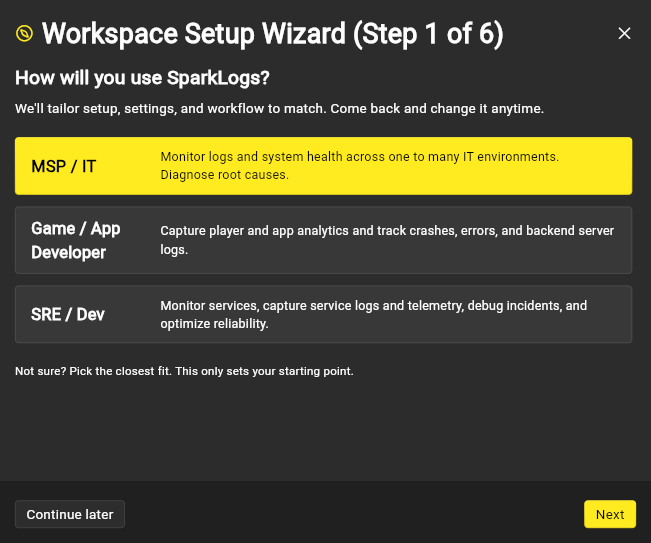
- MSP / IT. Monitor logs and system health across one or many IT environments, and diagnose root causes. SparkLogs deploys the SparkLogs Agent to your endpoints and to your clients' machines, and keeps client data isolated with a per-client organization hierarchy.
- Game / App Developer. Capture player and app analytics and track crashes, errors, and backend server logs. SparkLogs separates dev, staging, and production, and turns on app analytics.
- SRE / Dev. Monitor services, capture logs and telemetry, debug incidents, and improve reliability. SparkLogs separates your environments so each one is easy to query and scope access to.
What the wizard walks you through
- Choose how you'll use SparkLogs. Sets the recommended defaults below.
- Recommended defaults, or configure it yourself. Let the wizard create a sensible starting hierarchy and credentials, or skip ahead and build it by hand. See organization hierarchy for exactly what each path creates.
- Invite your team (optional). Add teammates and scope their access.
- Review. The wizard shows everything it will create before it makes any changes. Nothing runs until you confirm.
- It runs. The wizard creates your organizations and credentials.
- Next steps. You land on a checklist that points you to deploying the SparkLogs Agent and confirming data in Explore.
You can choose Continue later at any point and pick up where you left off.
What's next
- Set up your organization hierarchy: what the recommended defaults create for each persona, and how to design your own.
- Get your data in: the two ways to send data, the SparkLogs Agent or Ingest Keys with collectors and SDKs.
- Deploy the SparkLogs Agent, then confirm data is arriving in Explore.